The VLAN weekend
The servers stay on VLAN 10, and phones, laptops and the TV moved to VLAN 20. From there only Jellyfin and DNS are reachable.
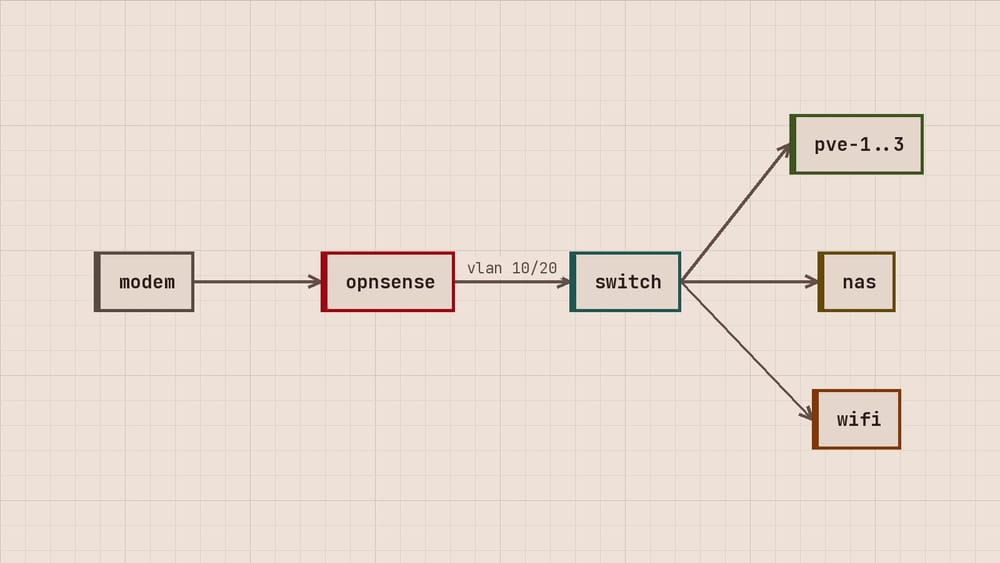
Edda here, with Tomasz on the Proxmox parts. Until this weekend every device in the house shared one network with the servers, the TV included, which talks to more servers abroad than we would like. Now the servers stay on VLAN 10 and everything with a screen or a battery is on VLAN 20. From VLAN 20 only Jellyfin and DNS can be reached.
The plan
| VLAN | Network | What is on it |
|---|---|---|
| 10 | 10.0.10.0/24 |
router, switch, pve-1 to pve-3, nas, pi-dns |
| 20 | 10.0.20.0/24 |
Wi-Fi, laptops, phones, the TV |
Router and switch
On OPNsense both VLANs sit on the LAN port, each with its own interface, DHCP range and rules. The switch port to the router carries both, tagged. The ports to the rack carry VLAN 10 untagged, so the servers noticed nothing. The access point gets both, one SSID for each.
- VLAN 20 may reach the internet.
- VLAN 20 may reach
10.0.10.53on port 53 and Jellyfin on10.0.10.31port 8096. - Everything else from VLAN 20 to VLAN 10 is blocked and logged.
Tagged guests on Proxmox
vmbr0 has been VLAN-aware since chapter 1 of the series, so a guest needs only a tag. The sandbox VM for software we do not trust moved to VLAN 20:
$ qm set 120 --net0 virtio,bridge=vmbr0,tag=20What went wrong on Saturday
The access point kept its management address on the untagged network, and once we tagged its port we could not reach it for an hour. Its setting for a management VLAN was two menus deep. We changed the port back, set the VLAN, and tagged the port again.

subscribe
New entries and the next chapter by mail, nothing else.